
 Mikko Hyvärinen, Lead DBA, DB Pro Services Oy
The ERP system of a global manufacturing company serves 8,000 users around the clock. When the system began to slow down and experience frequent outages, the company assembled a task force of experts. The result was a more stable and faster ERP system—running on a server half the size.
Starting Point: A System That Can’t Rest
An ERP system is the backbone of a manufacturing company. Orders, production, inventory, and finance all run through it, and when it slows down, the entire business slows down. Our client’s problems had piled up:
- Slow response times – the user interface was sluggish, and users had to wait for the screens to load.
- Numerous database locks – individual processes are blocking dozens of others.
- No maintenance window – the system is used 24/7 across different time zones around the world.
- Recurring service interruptions – the service was not always available.
- Rapidly growing volume of data – a large amount of new data is generated every day.
The first idea would be to add more hardware, but that was no longer possible. The database was running on a physical server with 48 cores and 768 GB of memory, and all processor and memory slots were already full. There was no room for expansion, so the problem had to be solved on the database and application side.
Taskforce
The client assembled a task force of experienced experts with a simple mission: to get the ERP system up and running again. And they had a generous three months to do so.
What We Did
The work progressed from measurements to repairs. Since there was no maintenance window, every change had to be planned so that it could be carried out while production was underway.
- We started with a diagnostic project to identify the actual bottlenecks in the database environment. Without measurement data, the fixes would have been guesswork.
- Changes to the disk array. We redesigned the disk configuration to distribute the read and write load more evenly.
- Maintenance of indexes and statistics. We optimize maintenance routines so that they keep the database in good condition without overburdening users.
- Query optimization. Part of the work involved reviewing and optimizing individual resource-intensive queries.
- Indexing Changes:
- new indices where they were really needed
- disabling unused and obsolete indexes
- data compression, which reduces the amount of disk space and memory required
Results: Better Performance on the Iron Side
When a database performs only the necessary tasks, it does not require as many resources. After the changes were made, the database could be moved from a full physical server to a virtual server with significantly fewer resources:
| Resource | Before | After | Change |
| Cores | 48 | 24 | −50 % |
| Memory (RAM) | 768 GB | 368 GB | −52 % |
| Disk Space Usage | 5 Tt | 3 Tt | −40 % |
License Savings
SQL Server Enterprise Edition is licensed on a per-core basis, so halving the number of cores directly affects licensing costs. With a 2-core license package estimated to cost $15,000, the savings amount to approximately $180,000:
| Before | After | Savings | |
| Cores | 48 | 24 | 24 |
| 2-core license packages | 24 | 12 | 12 |
| License Cost (Estimate) | 360 000 $ | 180 000 $ | 180 000 $ |
This calculation is for illustrative purposes only and is based on an estimated package price; the actual price depends on the contract type.
A smaller server didn’t mean poorer service—quite the opposite. Below are the metrics before and after.
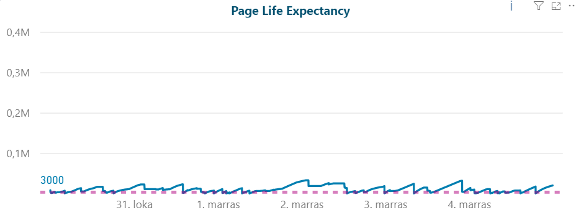
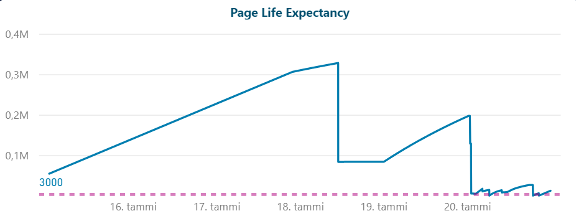
Page Life Expectancy – data remains in memory
Page Life Expectancy indicates how long (in seconds) a data page remains in SQL Server’s memory. The higher the value, the less frequently data needs to be retrieved from disk.
Before: the value consistently hovered near the 3,000 threshold, meaning memory was constantly in short supply.
After: the value rises to over 300,000 at its peak. On weekends, statistical updates for the largest leaderboards cause the value to drop momentarily, which is to be expected.
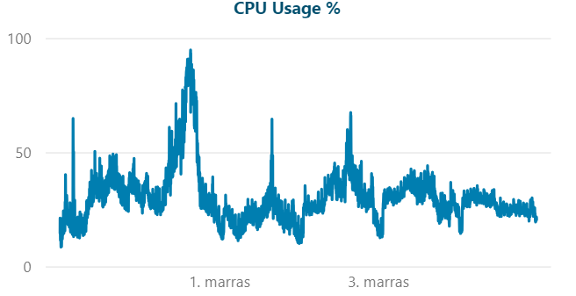
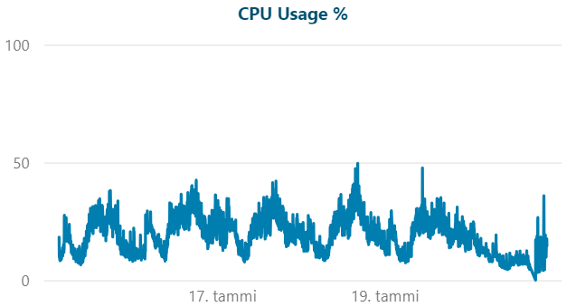
Processor load – more even on the side with the cores
Previously: long-lasting spikes of up to over 90%, even though there were 48 cores.
After: the load remains steady and mostly below 50%—now with 24 cores.
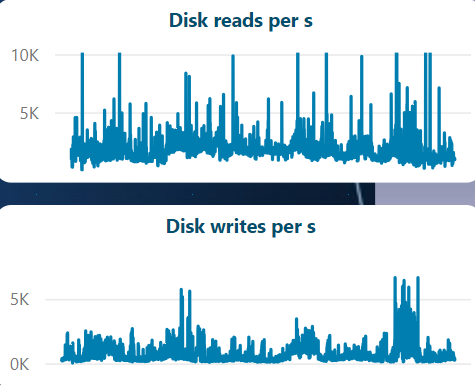
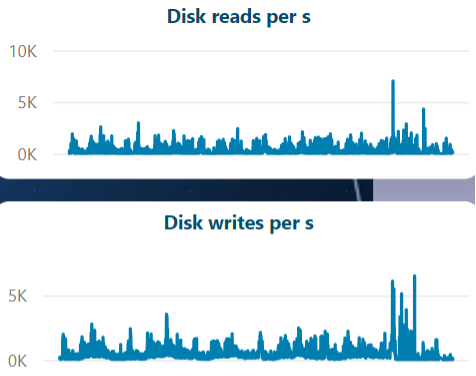
Reading and Writing to Disk – No Errors
Previously: disk reads frequently exceeded 10,000 per second.
Afterward: the read load is significantly lower and more consistent, since the data is retrieved from memory more often.
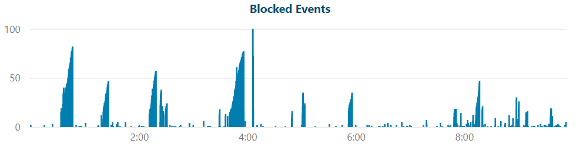
Database Lockouts – Monday Morning Without Lines
Earlier (Monday morning): five long-duration locks, each lasting 5–30 minutes and blocking more than 50 other processes at a time.
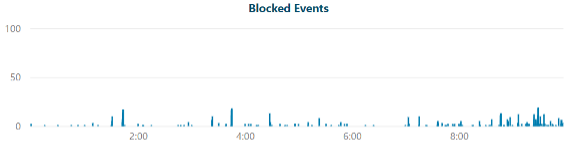
After that (Monday morning): the locks are short and isolated, and long queues no longer form.
What can we learn from this?
- Additional hardware won’t fix an inefficient database. In this case, it was only possible to cut resources in half once the database workload was brought under control.
- Measure first, then fix. The diagnostics showed where time and resources were actually being spent.
- Small things add up. A single missing index or a resource-intensive query can bring dozens of users to a standstill.
- 24/7 operation requires careful planning. Without a maintenance window, maintenance and changes must be carefully scheduled and planned.
Is your ERP system slow or unstable? Contact our experts—let’s work together to identify where the bottlenecks lie.
Best regards, Mikko Hyvärinen